The River2 Bookmarklet 
I wanted an easier way to subscribe to feeds..
So I wrote down the way I wanted it to work and this is what I came up with.
I'm on a site and think "Gee I'd like to subscribe to this." I see it's got an XML icon in the address bar.
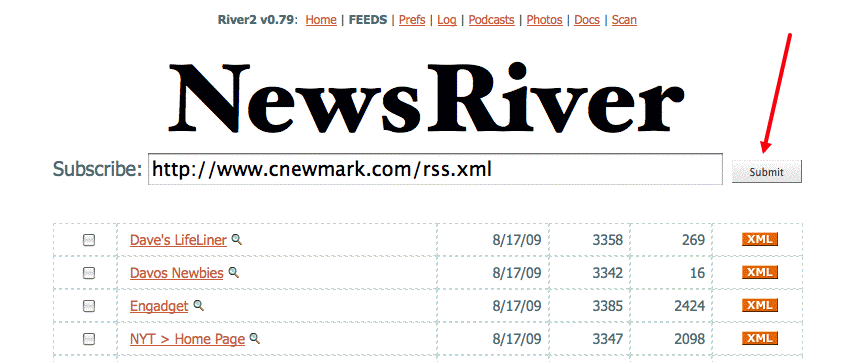
I click on a Bookmarklet and after a few seconds, am transported to the Feeds page in River2. To subscribe, I just click the Submit button.
So that's how I made it work! 
How to
1. Be sure that both the OPML Editor and River2 are fully updated.
2. The River2 version number should be 0.79 or greater. You can see the version number in menu area on every page in the desktop website.
3. Click this link, with the OPML Editor running, to go to the Bookmarklet install page.
4. Following the instructions on the page, drag the bookmarklet to your toolbar. You may want to rename it to something shorter.
5. Visit a page with a feed embedded. For example, Craig Newmark's blog.
6. Click the bookmarklet. You'll be transported to the Feeds page with the URL of his feed in the box.
7. Click Submit to subscribe.
Now, whenever you want to subscribe to a feed, just click the bookmarklet and it does all the tedious work for you.
Comments, questions
If you have comments or questions, please post them here.
blog comments powered by
|