Last update: Monday, April 20, 2009, 12:57:37 PM.

theOpmlEditor picture


Bootstrapping "OmMeme" Permalink to this headline.

Om, this is a howto just for you.

How to install Permalink to this headline.

Drag the bookmarklet, below, into the chrome of your browser.

OmMeme

How to push a link Permalink to this headline.

To push a link...

1. In the browser, go to the page you want to link to.

2. Click on the OmMeme bookmarklet.

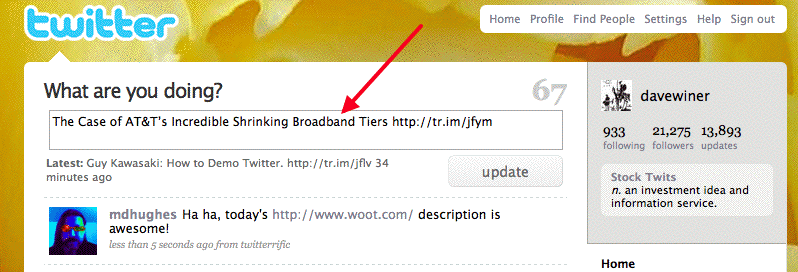
2. Your Twitter home page opens with the title of the page followed by the shortened URL in the edit box.

3. Edit the tweet as needed.

Important: There must be no text after the link in your tweet or else the link won't be recognized by the report writer app.

4. Click Submit.

5. Your report is at: http://twitter.scripting.com/guyTopLinks.html.

How it works Permalink to this headline.

The bookmarklet opens a page on redirect.twitterland.net -- one of my servers. It grabs the referrer link and shoots it over to tr.im, with your tri.im username and password as params (also the apikey they gave me). It returns the shortened URL. I take the title of the page, add the shortened URL, and then redirect to twitter.com.

Every five minutes:

1. I check if there have been any updates to your twitter account.

2. I check back with tr.im to see how many hits your 100 more recent links have gotten and

3. Prepare the report and upload it to S3.

Note that I do not need (or want) your Twitter account info. That's between you and Twitter.

Questions? Permalink to this headline.

Don't use the comments here to ask questions because that will alert people to the existence of this page. Not ready for that yet. :-)


blog comments powered by Disqus


First published: Monday, April 20, 2009, 12:57:37 PM.