MacBook sound woes
Tuesday, February 27, 2007 by Dave Winer.
 Somehow I ran the battery on my MacBook down to zero on the flight home last night, no problem, I charged it up to 40 percent and then sat down to watch the end of the movie I was watching when the battery got low (I shut the case at about 15 percent).
But the sound is off and I can't figure out how to get it back on. I pull down the sound icon in the menu bar, but it's dimmed out. I pull up the control panel for sound, the slider is dimmed. I tried rebooting twice.
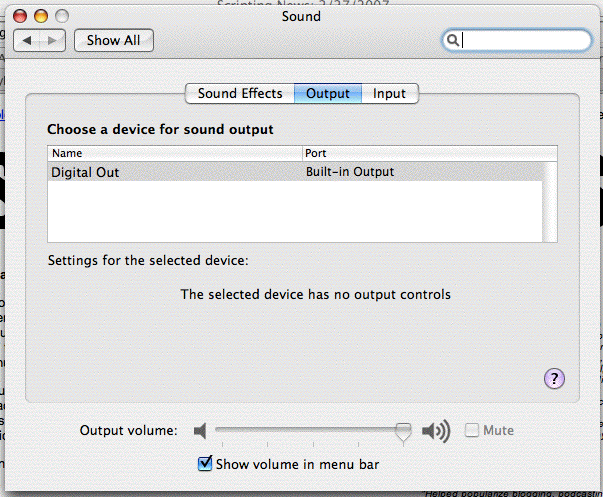
Any ideas what causes this and how to cure it?
Update #1: Vanni suggests looking at this technote, which causes me to run Audio Midi setup utility, which reveals that the system thinks it has no audio output. He asks if I hear any sound at all. Only when I reboot, it makes the big chime sound as the system starts up.
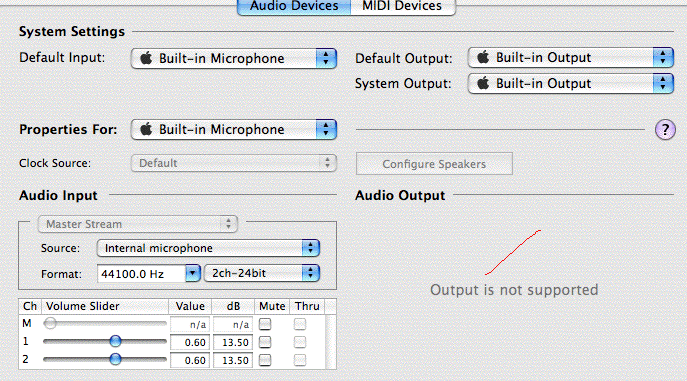
Update #2: Ideas that didn't fix the problem -- launch and quit GarageBand, zap the PRAM, etc. Ben Tucker suggested that the computer may be confused, and he was right. I had been using headphones on the plane, and when I plugged the headphones in, the slider enabled. When I unplug the headphones, it dimmed. So at least I can finish watching the movies, but only with headphones.
Update #3: Here's the club I belong to. Not an isolated problem. Probably a bug Apple should be aware of. Apparently a toothpick properly inserted in the headphone jack will fix it. I'm reluctant to do that.