Click here to show or hide the menubar.

Home >  Archive >  2010 >  June >  29

Previous / Next

Scripting2 change notes
By Dave Winer on Tuesday, June 29, 2010 at 7:34 AM.

This is where I record changes to the Scripting2 software. permalink

3/18/11; 4:51:30 PM by DW -- Updates to the bookmarklet permalink

New version of bookmarklet, a few improvements. permalink

To install the bookmarklet, drag this link to your toolbar: S2. permalink

Also update scripting2.root. To do so, bring it to the front and choose Update front tool in the Tools menu. permalink

Improvements: 1. Opens in a new tab. 2. If there is selected text it's a subhead. 3. OPML Editor comes to front. permalink

You can see an example in my "live blog" feed. permalink

3/18/11; 12:45:57 PM by DW permalink

My warmup project for today was to write a linkblogging bookmarklet for Scripting2.  permalink

I started to put it together, but when I went to the place where I would write the code, I found it was already there. Huh? permalink

So I searched the Changes page for "bookmarklet" and found it. Now it's all starting to come back. permalink

http://scripting.com/stories/2010/06/29/scripting2ChangeNotes.html#p601 permalink

Welcome back my friends to the show that never ends... permalink

We're back! WIth a new and improved scripting2.root -- with users! :-) permalink

It's now possible to run your own server. Here's the howto. I added some new sections that help you set up your server after the initial steps, and show you how to add new users. permalink

Other updates today bring us up to version 0.42. If you're new to scripting2, it pays to review these change notes. There are actual docs in here.  permalink

Today's fixes: 1. New User command in the Scripting2 sub-menu of the Tools menu. 2. The nav links at the top of each page were broken, should work again. 3. There's now a default header image for new sites, I felt the sites looked too stark on Day One.  permalink

Version 0.39 -- 8/18/10; 3:54:06 PM permalink

This version does not have the Instant Outliner. permalink

It has been pointed out elsewhere that the current release gets a scripterror about missing callbacks.  permalink

The sub-menu for I/O should be removed. But otherwise, I'm going to leave the code as-is. permalink

I am also starting to update Scripting2 through the normal updates mechanism. Its period of rock and roll is now behind us. permalink

Version 0.36 -- 7/26/10; 3:59:23 PM permalink

Small change -- when you click the Refresh button in the Buddies window, only those buddies whose outlines have changed are refreshed. If none of them have changed, a dialog informs you of that. permalink

Version 0.35 -- 7/20/10; 7:29:35 AM permalink

The realtime updating code behind the Instant Outliner was rebuilt so that it runs in the main part of the OPML Editor, not in scripting2.root. This is because the code seems so useful that I'll want to use it in many other places. The time to refactor it is when it's fresh and there are a small number of users. So this may cause a disruption, if so, I apologize in advance. (But there's a chance it will "just work.") permalink

You have to install version 0.35 to be able to see other people's updates. To do so, just choose the Reinstall scripting2.root command from the Scripting2 sub-menu of the Tools menu. Open your instant outline and create a new entry and save. If all goes well you should see your name update in the Buddies window, and so should the rest of us. permalink

As usual, report any problems on the Scripting2 mail list. permalink

Version 0.34 -- 7/17/10; 2:20:14 PM permalink

Added Refresh button to I/O buddy window. When you click it, we connect to the server and get the latest copies of the outlines from all members of the workgroup. Each buddy's name boldens. When you collapse/expand their name you'll see their latest stuff. This is how you get updated when you come back after being offline. permalink

Eventually this will be integrated into the opening of the buddy window, so you won't have to click the button, but the button will probably stay in the user interface. permalink

Version 0.33 -- 7/16/10; 8:32:20 AM permalink

Scripting2 now has an instant outlining capability. This means that members of a workgroup, the people who use the same server to host their blogs, can privately share notes about their work with the other members of the workgroup. permalink

1. Update your copy of Scripting2. Choose Reinstall scripting2.root from the Scripting2 sub-menu of the Tools menu and click OK to confirm that you want to replace Scripting2. (I had previously said this wasn't a legit way to update, that was a misunderstanding -- it is.) permalink

2. Choose Open My Outline from the Instant Outliner sub-menu of the Scripting2 menu. permalink

3. Click on the New Entry button, type something and click Save. The rest of us will see your name appear in our Buddies window, and your name will be bold. When we 2click your name we'll see your updated outline. Naturally, the same goes for you if you open your Buddies window.  permalink

You may not see anything happen for a while. It depends on who's at work. I will put a Refresh button in soon that allows you to instantly see all the outlines for everyone in the workgroup. permalink

Version 0.30 -- 7/12/10; 10:38:57 AM permalink

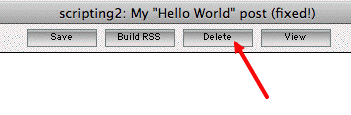
New button in Edit window -- Delete permalink

To delete a post, do the following very carefully, and watch what happens in each step and be ready to report problems. By its nature this is a dangerous command, and hard to test.  permalink

1. View the post in Firefox (or Chrome, Safari, etc). permalink

2. Click the Edit button. The OPML Editor should come to the front with a window open, containing the outline for the post. permalink

3. Note the new Delete button.  permalink

4. Click it. Click OK to the confirmation prompt. Wait a few seconds. permalink

That's it, your post is gone. permalink

PS: Thanks to Cyberianmuse for designing this feature, more or less, in a "bug report." permalink

Version 0.29 -- 7/10/10; 4:10:10 PM permalink

First cut at a link-blogging bookmarklet, below. permalink

To install, drag it to your toolbar, as with all bookmarklets. permalink

S2 permalink

Over in the OPML Editor, create a blog post that's to be your linkblog. With the curso on its summit, right-click, choose "Make live-blog" from the popup menu. I know, there's confusing terminology here. A live-blog and a link-blog are the same thing. permalink

Save the post. permalink

You can close the window and forget about it, until it's time to post a link to your link-blog.  permalink

When you want to do that, just click on the bookmarklet. The window will open in the OPML Editor, but it will not come to the front. You may want to gather a bunch of links. permalink

Then when you're ready to edit, bring the OPML Editor to the front and edit, then Save. Not only will the blog post get saved, but your live-blog feed will update as well. This is going to be important, in a bit. permalink

For right now, I'm stopping here, so I can use it a bit. permalink

When the user sets the name of his or her blog or the time zone etc on the Prefs page, rebuild the blog. permalink

You can now enter time zones that are greater than zero. The allowed range is -23 to 23. permalink

When saving a blog post in its own window, we now preserve the window size and location. permalink

Removed the Blogroll button in the Workspace window. permalink

When the OPML of each story is saved, we include the server XML-RPC address and the username as attributes on the summit headline. You can see these atts in the OPML for this page. Thanks to Marc Barrot for this excellent suggestion. permalink

Version 0.28 -- 7/10/10; 7:38:21 AM permalink

Adding blog posts to the Bookmarks menu was broken by a change made to eliminate duplicate text attributes on summits. Fixed.  permalink

RSS feeds now take their title, link and description from the blog prefs if they haven't been set independently (right now there's no UI to set them). permalink

For the generator of RSS feeds, use the version of Scripting2, not the version of the OPML Editor (which almost never changes, and isn't very relevant). permalink

Version 0.27 -- 7/9/10; 9:11:03 AM permalink

In the last version, when I "improved" the first-time user experience, but I actually made it worse.  permalink

Now it's really simple. After you install the Scripting2 tool, it redirects back to the HowTo page, where there's a form that asks for your username and password, right there in the Howto.  permalink

When you click Submit, the OPML Editor comes to the front, it checks with the server to see if the username and password are valid, if they are, it opens the Workspace with your Hello World post there. permalink

If the username and password aren't okay, it redirects back to the HowTo so you can enter them again. permalink

When saving a post, if the table of contents needs rebuilding, rebuild it. (Technically, it needs rebuilding if your post is in a new month, if the TOC doesn't have an entry for that month.) permalink

Welcoming two new users, Carla Cassilli and Russ Lipton. permalink

Version 0.25 -- 7/7/10; 8:20:04 AM permalink

Version 0.24 -- 7/6/10; 6:07:54 AM permalink

After much wrestling with CSS and with much help from scripting.com readers, we now have N-level hierarchy working in the story editor. You can read about it here and here. The hero is Daniel Kurejwowski, who laid it out in step-by-step instructions even I could follow. :-) permalink

To get it to work on your system, however, you're going to have to make changes to your stylesheet.  permalink

If you haven't made changes to your stylesheet, follow these instructions carefully: permalink

1. Copy this URL to the clipboard. permalink

2. In the OPML Editor, choose Open URL from the File menu. permalink

3. Paste. Click OK. permalink

4. At the top level of the outline, Select-All. Copy. permalink

5. Choose Open Stylesheet from the Scripting2 sub-menu of the Tools menu. permalink

6. At the top level of the outline, Select-All. Choose Clear from the Edit menu. permalink

7. Paste. (The new stylesheet text should now be in your stylesheet window.) permalink

8. Click the Save button in the Stylesheet window. permalink

If you have made changes to your stylesheet. permalink

Repeat the steps as Daniel outlined them for me. It's very straightforward, and it worked the first time. He's got a gift as a docs writer.  permalink

Version 0.23 -- 7/5/10; 2:18:18 PM permalink

The Install script now opens the Workspace and opens your browser to the Getting Started section of the Scripting2 home page. permalink

Made a change in the OPML we generate. The first attribute of <?xml> must be version. Marc Barrot's outliner would fail on reading our OPML, so I hacked the output of op.outlineToXml to conform. Here's an example. permalink

Version 0.22 -- 7/5/10; 10:16:05 AM permalink

Major shakeup on the server, but shouldn't have any impact on users.  permalink

Fixed the problem with Blogroll window opening without buttons the first time you open it. To get the fix, in addition to updating Scripting2 to v0.22, you must also update opml.root. The command that does this is in the File menu. permalink

Version 0.21 -- 7/4/10; 6:11:06 PM permalink

Lots of little UI tweaks, you'll stumble across them as you use the software. permalink

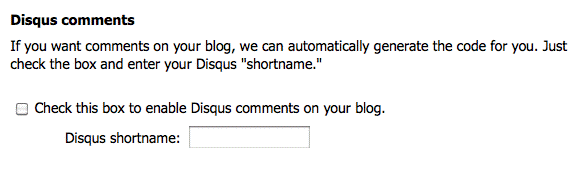
The big change in this release is that you get to manage your own Disqus comments, or decide if you want them or not. permalink

There's a new pair of prefs that turn comments on (they default to off) and allow you to tell us what your Disqus "shortname" is. Screen shot. permalink

After you set the prefs, you have to save a post to have them take effect on your blog. permalink

The advantage of having each of us with our own Disqus setup is that you can get the emails for your comments and I can get mine, etc. You can also determine your moderation prefs on Disqus. It's an excellent product, I've been using it for years. :-) permalink

Version 0.20 -- 7/4/10; 5:23:31 AM permalink

Various cleanups in the OPML generated that's attached to blog posts. Set the title of the OPML we generate and the dateCreated. Also it generates, for some unknown reason, a second text attribute on the summit headline. We get rid of it using string processing. Working around a bug somewhere. permalink

For example, here's the OPML generated for this post. permalink

Version 0.19 -- 7/3/10; 2:21:14 PM permalink

In this version we make it so that the Edit button only displays in pages you can edit. To do this I have to hack the storyTemplate for all of you guys. Hope you don't mind. :-) permalink

It will only work on stories created with v0.19 or greater. Older stories you'll have to be careful about editing (but you shouldn't have to worry about saving them). permalink

Version 0.18 -- 7/3/10; 9:34:36 AM permalink

The update to v0.18 is mandatory. Previous versions will not be able to create new posts on the server because there was a protocol change.  permalink

Protocol change. When the user clicks New Post in workspace, we send a message to the server with the title of the post and it returns a token that it stashes in a table. permalink

The first time the post is saved, if the token is present, it goes through as before.  permalink

However if the token is not present, the save fails with an error message. Something like "Can't save the post because we don't recognize this format."  permalink

Hopefully no one will see the message, but if they do, it will generate bug reports and hopefully will be reproducible -- since the error will happen closer in time to when the action that caused it occurred.  permalink

I'm hoping no one sees it. <img src="> permalink

How to update permalink

1. Choose Tool Catalog from the Misc menu. permalink

2. Click on the Install link next to Scripting2. permalink

3. Click OK to all confirmation prompts. permalink

Version 0.17 -- 7/3/10; 6:22:04 AM permalink

You can now save a post by pressing Cmd-S or Control-S or choosing File/Save with its edit window or the workspace in front. permalink

We now log RSS builds. permalink

How To insert an image into a blog post permalink

A picture named smallball.gif1. From your graphics program, save a copy of the image into the images folder. By default this folder is a sub-folder of the Scripting2 folder in your OPML app folder. permalink

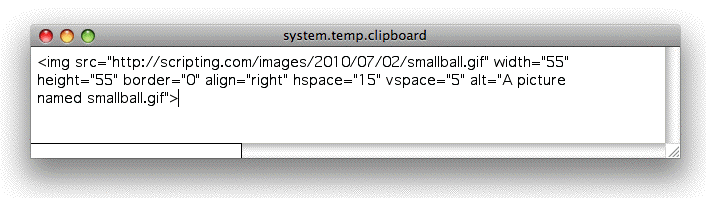
2. After a few seconds a clipboard window appears in the OPML Editor with the HTML text for the image.  permalink

3. Select-all and paste it into your blog post. It will appear right-justified. If you want it to be inline, delete the align="right" attribute from the <img>. permalink

Version 0.16 -- 7/2/10; 7:39:56 PM permalink

Big feature in this release -- lots of new settings on the Preferences page. To get there, choose Preferences from the Scripting2 sub-menu of the Tools menu. A web page opens. You can change the name of your weblog, edit your name, email address, timezone, the name of your timezone and your weblog's tagline or description.  permalink

Added logging when you create a new post or edit an existing post. There is a log readout page. This is a community feature, the first one. <img src="> permalink

Version 0.15 -- 7/2/10; 7:08:47 AM permalink

New command in the Scripting2 sub-menu of the Tools menu allows you to set the header graphic. permalink

To begin, in a graphics editor, create the image. It must be either a GIF or JPEG. permalink

In the OPML Editor, choose the Choose header graphic command from the Scripting2 sub-menu of the Tools menu. permalink

A dialog appears asking you to locate the file.  permalink

Once you click the Open button, the file is uploaded to the server and your home page is automatically rebuilt. permalink

To see what the new header graphic looks like refresh the home page of your weblog. permalink

To test the command, I've changed the header graphic on scripting.com. permalink

Version 0.14 -- 7/1/10; 7:10:06 AM permalink

A picture named smallball.gifThe big feature in this version is support for an images folder. permalink

The folder is created by default as a sub-folder of the Scripting2 sub-folder of the OPML folder (the one that contains the OPML application). You can change the location of the folder through the Preferences page. permalink

To upload a picture, drop a copy of it into the images folder. With ten seconds it will be read and uploaded to the server and the HTML text of an <img> will appear in a window. You can then paste this into a blog post. permalink

At this point there is no limit to the size or number of images you can upload, however there will probably be a limit at some point in the future. permalink

A copy of the image file is also placed in the backup folder on your local hard drive. It's also configurable from the Preferences page. permalink

The image of the soccer ball to the right was uploaded with this facility. <img src="> permalink

Note: I installed 0.14 on the edit.scripting2.com server.  permalink

Version 0.13 -- 6/30/10; 7:55:08 PM by DW permalink

There's now a rudimentary browser-based Preferences page.  permalink

You can access it through a command in the Scripting2 sub-menu of the Tools menu. permalink

It's also accessible through the Preferences command in the Misc menu. permalink

Version 0.12 -- 6/30/10; 5:35:35 PM by DW permalink

You can now map a domain to a blog post. Here's how you do it. permalink

1. Through your registrar, create a new CNAME record and point it at mapper.scripting2.com. permalink

2. View the blog post that you want to map the CNAME to in your browser and click on its Edit button to open its source code in the OPML Editor. permalink

3. In the OPML Editor, right-click on its title headline. Choose Map Domain from the pop-up menu. permalink

4. Enter the CNAME created in step 1. permalink

5. Save the post. The mapping doesn't take place until you do the save. permalink

6. You should now be able to enter the name in your browser and it should display the post. permalink

I used this feature to map changes.scripting2.com to this post. permalink

6/30/10 by DW permalink

New option in right-click menu allows sub-text to be initially visible instead of hidden. This document, the change notes page, uses that feature. The role sub-text plays in this document is different from a typical blog post. Not sure whether this text should appear in the RSS feed. I'm assuming it will largely be used for posts that are not part of the weblog's chronology. permalink

Standalone edit windows qualify as editing windows. You can now create bookmarks in these windows. The right-click menu works in these windows. permalink

The extra commands in the right-click menu now only appear if the cursor is pointing at the title of a blog post. permalink

Added a command to the Tools sub-menu that upgrades scripting2.root to the latest version without me having to send a copy via email to each of the testers. permalink

scripting2.root now has a version number. We're starting with version 0.11. You can see the version number by jumping to (Cmd-J on the Mac) scripting2Info.version.  permalink

6/29/10 by DW permalink

You can now bookmark a blog post to edit it later. To do so, place the cursor somewhere inside the post and choose Add Bookmark from the Bookmarks menu. A confirmation dialog appears. Click OK. Now when you want to edit the document just choose it from the menu. Particularly useful for "standalone" posts that don't appear in the blog's chronology. permalink

When creating a new post, we create a blank line under the title headline. The attributes of that line weren't being set. Now we call the opInsertCallback set the attributes. permalink

Wrote a doc explaining how to turn on the Bookmarks menu in the OPML Editor. permalink

Before 6/29 permalink

Paragraph permalinks run off serial number. permalink

Getting ready for 1 or 2 non-Dave users. (Prepare for this by starting a second blog.) permalink

Edit This Page buttons. permalink

Right-click menu in editor. permalink

Paragraph-level permalinks as a pref. permalink

Added a mini XML icon under the blogroll linking to the OPML. permalink

When opening the blogroll, stylesheet or a template locally, if we already have the outline locally we don't get it from the server. If it's already open in a window we just bring it to the front. permalink

Added discovery link for blogroll in both templates. Add discovery link for story source OPML to story pages. permalink

Added day of week to byline text and the "last updated" text on the home page. permalink

The day level Next/Prev links were all fucked. The AddPost routine was initializing the links whether or not the post was new. Now it only does it if they are new. Wrote a utility to fix all the links in case we ever need it again.  permalink

We save the templates to the site, and include a comment (automatically generated) in the HTML that says where they are. This way you get a View Source capability for all Scripting2 blogs, automatically. It is on by default but there is a pref as well.  permalink

Click on a permalink on a story page, now you go to the beginning of the paragraph, instead of the end. There was confusion between the two uses of the same ID. permalink

The blogroll is saved to the website as an OPML file. permalink

scripting2.com placeholder site is up. permalink

New Tweet button in the Editor window. permalink

When you change the title of a story the URL stays the same.  permalink

When you create a new story the previous story is rebuilt because its Next link changed. permalink

The first time you update in a day, all the other pages in the month are now rebuilt because their calendars have a new day. permalink

On the home page, the most recent day's stories are expanded, all other stories are collapsed. permalink

There's now a UI for editing the stylesheet. It synchs immediately when you save it. permalink

When you save the blogroll the Home page is rebuilt. permalink

The blogroll is now editable. permalink

Third-level text is implemented (it was #9 on the original to-do list). permalink

Display bugs in expand/collapse on home page were fixed (#13 on the original list). permalink

To-do permalink

Finish documenting the API. permalink

Bookmarklet for linkblogging. permalink

Referencing pages with custom domains can be more efficient. permalink

Why are windows losing their size and position values? permalink

Connection between link-blogging and Twitter. permalink

Display the version number someone in the UI. permalink

Inclusion. permalink

Easy UI for attaching a podcast to a post. permalink

Build a first version of the AMI for the server. permalink

An RSS feed for the community. permalink

Editing the glossary. permalink

Previewing a post before publishing (a Publish button, possibly replaces the Build RSS button). permalink

As an outline leaves the OPML Editor, change the type attribute of non-standard types to be namespaced, to conform to the OPML 2.0 spec.  permalink

Template library. permalink

The CMS should be fully time-zone-aware.  permalink

Some of the functions already are, and there's a routine, getLocalTime, that converts server time to the author's idea of the time. permalink

RSS feed for Scripting News
This site contributes to the scripting.com community river.


© Copyright 1997-2012 Dave Winer. Last update: Friday, March 18, 2011 at 5:44 PM Eastern. Last build: 8/26/2012; 5:49:08 PM. "It's even worse than it appears."

RSS feed for Scripting News

Previous / Next